

Protocol Setup
Follow these steps to configure and generate PDF protocols in KumiteTechnology.
1. Go to Protocol Setup
Open your tournament settings dashboard and select Protocol Setup from the navigation menu.
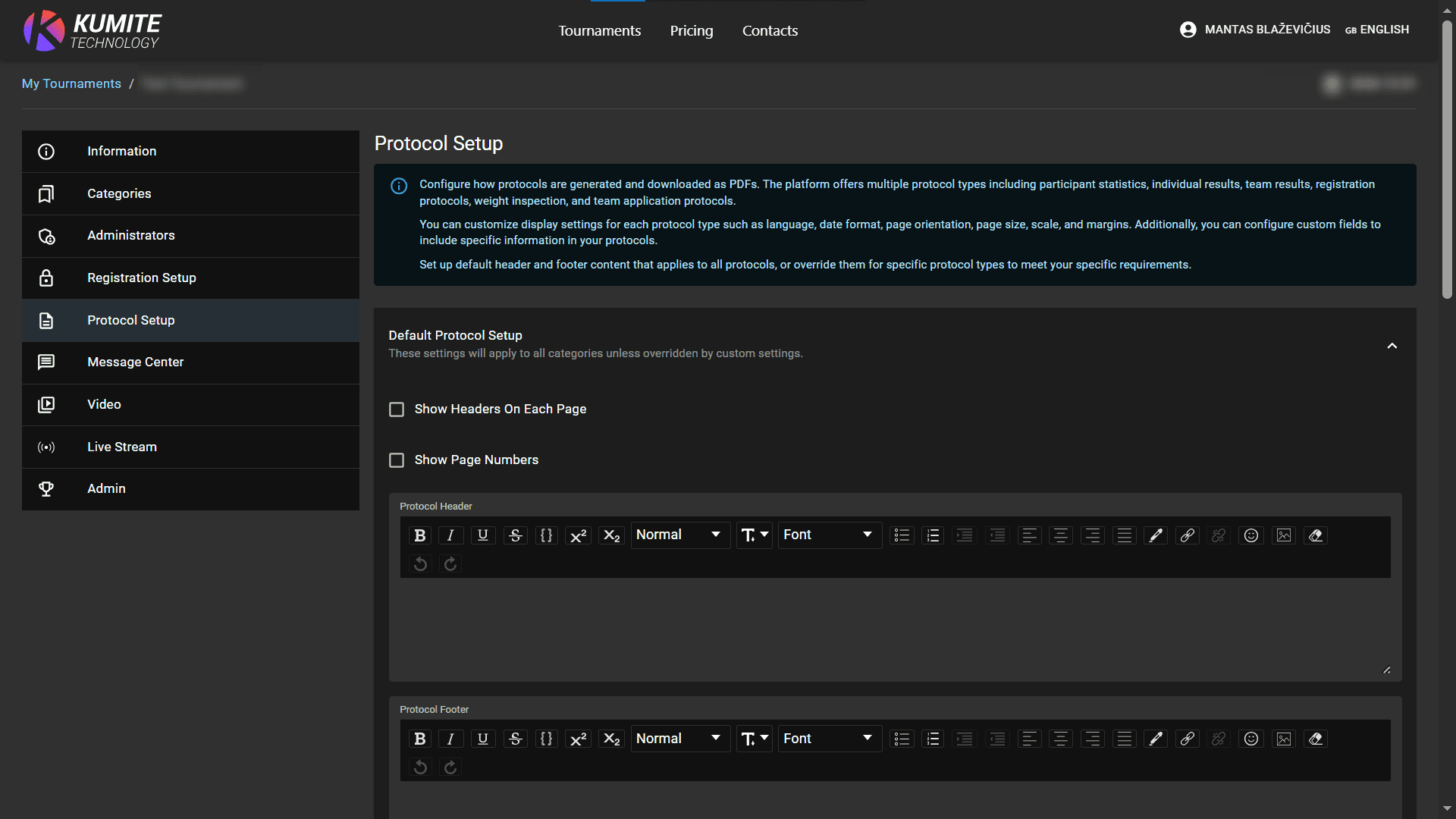
2. Configure Default Layout
Set up the appearance for all your documents. These settings apply to all types of protocols unless overridden:
- Headers and Footers: Use the rich text editor to add logos, tournament names, or sponsorship info. Enable Show Headers On Each Page if needed.
- Page Numbers: Toggle Show Page Numbers for easier document navigation.
- Formatting: Select your preferred language, date format, page orientation (Portrait/Landscape), and size (e.g., A4).
- Margins and Scale: Adjust the scale and margins (in mm) to ensure the content fits your printer settings. Click
Save Settings.
3. Manage Protocol Types
Scroll down to the Protocol Types section to handle specific document needs:
- Available Types: Participant Statistics, Individual Results, Team Results, Registration Protocols, and more.
- Configure: Click
Configurenext to a specific protocol to set custom fields or unique headers that differ from the default setup. - Download: Click
Downloadto generate the PDF file based on current tournament data.